Thanks for vising my blog
Reach out for tailored PPC Campaign setup and expert assistance.
Loading
56/ A, Mirpur -10, Dhaka, Bangladesh
dataexpertpro@gmail.com
+8801708001005
10 Common PPC Mistakes Killing Your Sales
— And How to Fix Them
Stop wasting budget, boost conversions, optimize your PPC campaigns, and unlock your full potential
Google Ads ⑊ PPC Campaign Optimization
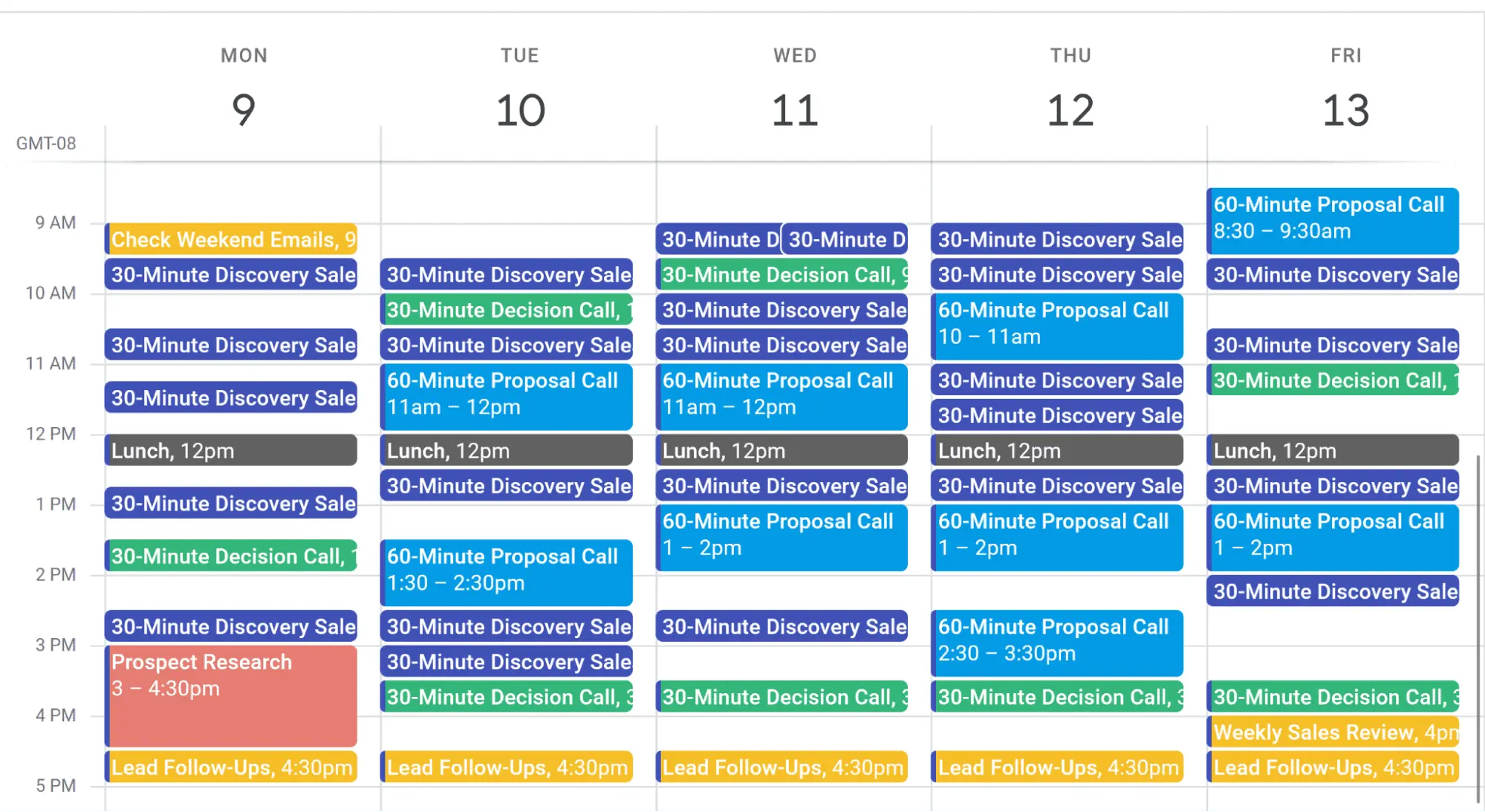
Imagine sitting at your computer, opening your calendar, and seeing it packed with sales meetings. Or logging into Google Analytics dashboard with the “leads and meetings booked’ metric shooting sharply upward.
There’s simply nothing like it.
Unfortunately, it doesn’t just happen by itself.
To win with PPC, you need to get in front of the right people, convert cold traffic fast, and scale profitably—without burning cash or waiting forever for results. Most agencies struggle here.
The truth? With a handful of proven, rarely-executed techniques, you can turn PPC into a steady stream of high-quality leads and booked meetings—predictably, profitably, and without the guesswork. For those who use them, these methods change everything.
At DataExpert, we’ve spent the last five years helping hundreds of B2B tech companies turn PPC into a predictable, scalable lead machine—without wasting years on trial-and-error.
Before that, I led digital marketing for Samsung, Microsoft, and other global brands, building strategies that have delivered results since 2006.
This eBook distills my most effective, battle-tested PPC tactics for the B2B tech industry. Apply them, and you’ll skip the costly learning curve while building a channel that beats your competitors and fills your sales calendar with qualified meetings.
I focus on Google Ads and LinkedIn Ads—the power duo of B2B lead gen—but the strategies work across any PPC platform.
You’re about to discover:
Ready to take your digital marketing to the next level? Let’s get started .
The biggest reason tech teams fail with PPC? They treat their audience like one-size-fits-all. They blast a single ad and offer at a mixed crowd and wonder why leads don’t convert.
Successful PPC starts with segmentation. Split your audience by industry, role, and awareness level (hot vs. cold). Then, create targeted offers and ads for each group.
For example, a database company we worked with had just one LinkedIn ad for software execs and finance leaders—cold and hot prospects combined—offering only “Book a Demo.” Result? Crickets.
We flipped the script: segmented campaigns by sector and persona, tailored offers like free case studies for cold execs, nurtured leads with email, then offered demos. Outcome: leads up 775%, cost per lead down 91% in 3 months.
Lesson: One ad doesn’t fit all. Match your message to your audience—and watch conversions soar.
Ignoring Google Ads? It’s niche, CPCs are insane, and leads are poor quality.” Sound familiar? It’s a myth.
Google remains the first stop for buyers researching tech solutions. Yes, search volume is low—but those clicks are gold. Enterprise leads convert better and bring higher revenue.
Struggling with CPC? Focus on top-of-funnel informational offers with lower CPC, improve your Quality Score, and use precise keywords (including conference names). Qualify leads in ad copy and use negative keywords to block tire-kickers. Google Ads is your best bet for intent-driven, scalable lead gen—don’t skip it.
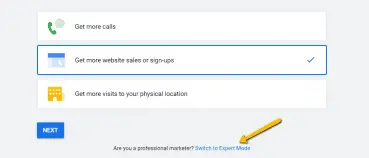
Avoid Using An Express Account
When creating a Google Ads Account, avoid the express account and smart campaigns as much as possible. Instead, go through the expert mode and build everything independently. See, the express and smart routes basically take your control over your ads and account and give it over to Google, who definitely does not have you saving money as a goal. Don’t be intimidated by the “expert mode” name, it’s actually pretty intuitive to figure out—and the savings will be worth it.
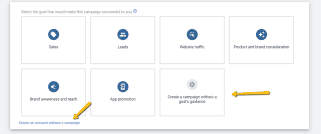
Avoid Using Goals Guidance
Even when using the expert mode, Google Ads will attempt to get you to select a goal guidance. This will push you into an automated setup similar to setting up an express account, leaving you with less control over your campaigns and ad groups. So don’t do that. Instead, either create an account without a campaign or create a campaign without goals guidance.
Don’t Use Maximize Clicks Bidding
Google Ads sets the bidding to Maximize Clicks automatically. This is basically handing over your entire budget to Google and letting them decide how much to use…which is a lot like handing your wallet to a kid in a candy store.
In theory, Maximize Clicks is a good bidding strategy because it does, well, maximize your clicks, but in my experience, you end up getting so few conversions from those clicks that it is not worth it. I suggest using Manual CPC instead, as you will have the ability to fully optimize your ads by setting up each keyword or ad group bid to precisely what you want.
Don’t Use Broad Match Keyword Targeting
By default, Google Ads will have you using Broad Match (also called Pure Match) for your keywords. This gives a lot of control and liberty to Google, and more often than not it will make your keyword targeting too broad to connect with the audience you want to reach. (Remember Mistake #1!)
One of the only times when you’ll want to use this is if you are being extremely aggressive and don’t necessarily care about efficiency. But for targeted B2B ads, that won’t happen often. So instead of Broad Match, go for Exact Match or Phrase Match.
Pro tip: For Broad Match Modifier, you simply put a plus sign in front of the keywords that you want to be in the search, e.g., +marketing +agency. For Exact Match, you put brackets around the keywords you want to rank for precisely as they are, e.g., . For Phrase Match, you will put quotation marks around the phrase you want to rank for, e.g., “marketing agency.”
Don’t Run Search Ads & Display Ads in the Same Campaign
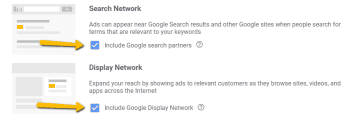
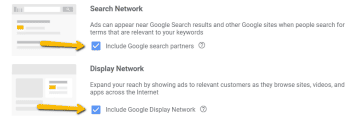
Google Ads likes to lump together search and display ads. This is a dangerous default setting and one that you will definitely want to turn off right away.
Why? Because these two campaign types behave entirely differently. Combining them is like trying to advertise to two different segments simultaneously, except this time, the segments are ad types rather than audience types. At the very
least, your conversion rates will be different between the two ad types, which alone is enough to make separating them hugely important. Even worse, combining them is deceptive—it will increase your impressions, which seems good, but actually lower your click-through rate.
So make sure you don’t let Google combine the two ad types by default. Make sure your budget and your bid are different for each of them.

Exclude Search Partners
When starting a campaign or ad, you want to control the traffic as much as possible. The default Google Ads settings include their search network. This means you will get traffic from lower-end search engines and search results for e-commerce stores. In some specific circumstances, this could be good, but in general, when first starting a campaign or ad, it’s not helpful.
Here’s a stat to drop: just 2% of PPC ads get 50% of all clicks. Another 18% grab 30% of clicks. That leaves 80% of ads fighting over the scraps. Which side do you want to be on?
The difference? Killer ad copy. Great copy cuts through the noise and crushes competition. You don’t need to be a pro writer—just avoid common mistakes:
Example:
Bad: Complete CRM Solutions | Plans from $100/mo
Good: Automate Your CRM in 3 Steps | No More Lazy Sales Rep Notes
Tech buyers hate ads—and they can smell sales pitches from a mile away. Push too hard, and they bounce instantly.
The secret? Lead with value and solutions, not sales. Don’t ask for the sale on the first date. Instead, offer educational content that addresses their real problems: webinars, whitepapers, case studies.
Make your ads look like insightful articles, not sales pitches—native, helpful, and relevant. This builds trust, boosts CTR, lowers CPC, and cuts CPL.
Step-by-step:
For ready-to-buy prospects (~3%), send straight to product demos or meetings. For the rest, nurture first—this approach converts better.
LinkedIn has the most qualified B2B audience—but ads can cost $10–$40+ per click. That used to scare me off too.
Then came Lead Form Ads—game changer. These let users submit their info inside LinkedIn without leaving the platform, massively boosting conversion rates by cutting out landing page friction.
LinkedIn rewards these ads by showing them more often, because users stay longer.
Your prospect clicked your ad—great! But landing page success isn’t guaranteed. They’re curious but skeptical, deciding fast if they can trust you and if you can solve their problem.
You must answer their biggest questions immediately, before they ask. No mind reading needed—these questions are out there, asked by thousands already. Your job? Find them and address them front and center.
How to find those questions:
You get a demo request… and then the chaos starts. Back-and-forth emails, missed calls, awkward Zoom waits. Sound familiar?
Stop the madness. Use a calendar tool like Calendly, ChiliPiper, or HubSpot to let prospects pick their own time—no emails required.
Benefits:
Leads download content or attend webinars but then vanish. Why? You didn’t follow up.
Fix this with two easy moves:
Target the right message to the right prospect’s stage. This boosts CTR and conversions—turning interest into action.
More than half of all clicks come from mobile devices—yet many PPC campaigns treat mobile like an afterthought.
If your ads, landing pages, or forms aren’t optimized for mobile, you’re losing a huge chunk of potential customers. Slow load times, clunky navigation, or forms that don’t work on phones kill conversions fast.
What to do:
Mobile is where your audience lives—meet them there or lose them for good.


Reach out for tailored PPC Campaign setup and expert assistance.